US International
Keyboard layout
Holding the right Alt Key (Alt Gr) while pressing another key on the US International Keyboard yields the blue characters depicted in the layout below. Shown here is the PC104 (with 104 keys) which will obviously differ slightly with many notebook layouts.
Example 1: to type the Euro sign € hold the Alt Gr and press 5
Example 2: to type a capital C cedilla Ç hold both the Alt Gr and a Shift key and press ,
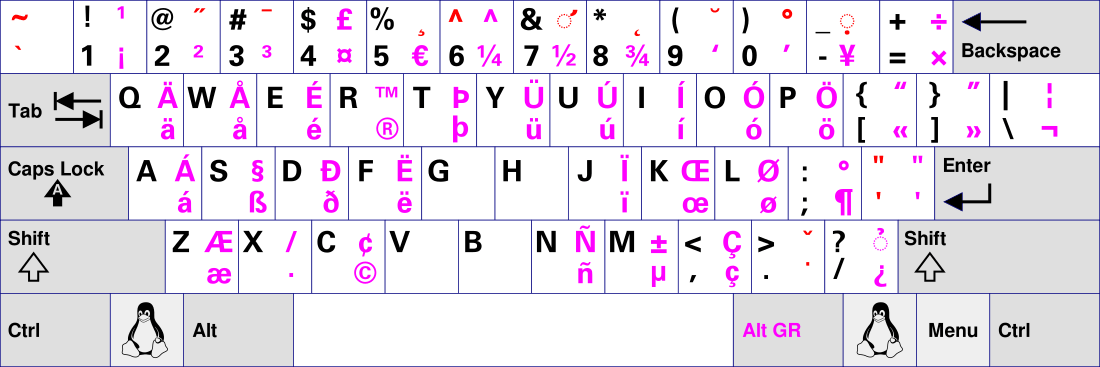
Type characters that are used less frequently, e.g. currency symbols, typographic marks and accented letters in other languages: French, German, Icelandic, Danish, etc.
Dead keys
There are more than a dozen dead keys on (Kubuntu) Linux and most of these are combinations with Shift and / or Alt Gr.
First press the dead key (combination) then release the dead key (combination), and subsequently type a letter.
Example 1: To type Ô, press Shift + 6, release and type O
Example 2: To type ğ, press Alt Gr + Shift + 9, release and type g
In some cases you can combine two diacritics like in ậ; first press the dead keys for the circumflex and then the dead keys for the underdot (or vice versa).
Pressing a dead key followed by pressing the space bar produces the character denoted by the dead key; e.g. ~ + space results in “~”, see the Tilde row in the table below.
Dead keys with the International Keyboard
Below are most of the permutations of diacritical accents on the International US keyboard [ pc104-layout us-variant intl ] on Kubuntu or Ubuntu:
| Diacritic | Dead key | Space | E | e | A | a | O | o | U | u | Y | y | I | i | Z | z | R | r | M | m | N | n | P | p | W | w | S | s | G | g | K | k | L | l | C | c |
|---|---|---|---|---|---|---|---|---|---|---|---|---|---|---|---|---|---|---|---|---|---|---|---|---|---|---|---|---|---|---|---|---|---|---|---|---|
| Acute | ' or ´ | ' | É | é | Á | á | Ó | ó | Ú | ú | Ý | ý | Í | í | Ź | ź | Ŕ | ŕ | Ḿ | ḿ | Ń | ń | Ṕ | ṕ | Ẃ | ẃ | Ś | ś | Ǵ | ǵ | Ḱ | ḱ | Ĺ | ĺ | Ć | ć |
| Grave | ` | ` | È | è | À | à | Ò | ò | Ù | ù | Ỳ | ỳ | Ì | ì | M̀ | m̀ | Ǹ | ǹ | Ẁ | ẁ | ||||||||||||||||
| Umlaut | Shift + ' (") | ¨ | Ë | ë | Ä | ä | Ö | ö | Ü | ü | Ÿ | ÿ | Ï | ï | Ẅ | ẅ | ||||||||||||||||||||
| Tilde | Shift + ` (~) | ~ | Ẽ | ẽ | Ã | ã | Õ | õ | Ũ | ũ | Ỹ | ỹ | Ĩ | ĩ | Ñ | ñ | ||||||||||||||||||||
| Circumflex | Shift + 6 (^) | ^ | Ê | ê | Â | â | Ô | ô | Û | û | Ŷ | ŷ | Î | î | Ẑ | ẑ | Ŵ | ŵ | Ŝ | ŝ | Ĝ | ĝ | Ĉ | ĉ | ||||||||||||
| Breve | Alt Gr + Shift + 9 or Shift + ? | ˘ | Ĕ | ĕ | Ă | ă | Ŏ | ŏ | Ŭ | ŭ | Ĭ | ĭ | Ğ | ğ | ||||||||||||||||||||||
| Háček | Alt Gr + Shift + . (>) | ˇ | Ě | ě | Ǎ | ǎ | Ǒ | ǒ | Ǔ | ǔ | Ǐ | ǐ | Ž | ž | Ř | ř | Ň | ň | Š | š | Ǧ | ǧ | Ǩ | ǩ | Ľ | ľ | Č | č | ||||||||
| Double acute | Alt Gr + Shift + 2 | ˝ | Ő | ő | Ű | ű | ||||||||||||||||||||||||||||||
| Ogonek | Alt Gr + Shift + 8 | ˛ | Ę | ę | Ą | ą | Ǫ | ǫ | Ų | ų | Į | į | ||||||||||||||||||||||||
| Macron | Alt Gr + Shift + 3 | ¯ | Ē | ē | Ā | ā | Ō | ō | Ū | ū | Ȳ | ȳ | Ī | ī | ||||||||||||||||||||||
| Overdot | Alt Gr + . | ˙ | Ė | ė | Ȧ | ȧ | Ȯ | Ȯ | Ẏ | ẏ | İ | ı | Ż | ż | Ṙ | ṙ | Ṁ | ṁ | Ṅ | ṅ | Ṗ | ṗ | Ẇ | ẇ | Ṡ | ṡ | Ġ | ġ | Ċ | ċ | ||||||
| Underdot | Alt Gr + Shift + - | . | Ẹ | ẹ | Ạ | ạ | Ọ | ọ | Ụ | ụ | Ỵ | ỵ | Ị | ị | Ẓ | ẓ | Ṛ | ṛ | Ṃ | ṃ | Ṇ | ṇ | Ẉ | ẉ | Ṣ | ṣ | Ḳ | ḳ | Ḷ | ḷ | c | |||||
| Ring | Alt Gr + Shift + 0 | ◌̊ | Å | å | Ů | ů | ẙ | ẘ | ||||||||||||||||||||||||||||
| Hook (above) | Alt Gr + Shift + ? | ◌̉ | Ẻ | ẻ | Ả | ả | Ỏ | ỏ | Ủ | ủ | Ỷ | ỷ | Ỉ | ỉ | Ȥ | ȥ | R | ɼ | Ɱ | ɱ | Ɲ | ɲ | Ƥ | ƥ | Ⱳ | ⱳ | ʂ | Ɠ | ɠ | Ƙ | ƙ | Ƈ | ƈ | |||
| Cedilla | Alt Gr + Shift + 5 | ¸ | Ȩ | ȩ | Ŗ | ŗ | Ņ | ņ | p | Ş | ş | Ģ | ģ | Ķ | ķ | Ļ | ļ | Ç | ç |
Selecting the keyboard layout
To use the US International Keyboard Layout under KDE select:
System Settings > Keyboard > Keyboard layouts,
then under Variant or Model choose "International with Dead Keys", other languages, e.g. (NL) dode toetsen, (DE) Tottasten, (FR) touches morte.
Compose key
To use the compose key or first you need to assign one. Go to System Settings > Keyboard > Keyboard bindings select/enable the compose key and check for instance the left Windows key.
Useful compose key combinations
| First | Second | Result |
|---|---|---|
| + | - | ± |
| t | m | ™ |
| s | s | ß |
| a | e | æ |
| % | o | ‰ |
| o | e | œ |
| _ | 1234567890 | ₁₂₃₄₅₆₇₈₉₀ subscript |
| ^ | 1234567890 | ¹²³⁴⁵⁶⁷⁸⁹⁰ superscript |
| digit | digit | ½⅓⅕⅚⅜⅝⅞ fraction |
| e | e | ə |
| / | l L | ł Ł |
| b | g G | ğ Ğ breve |
| c | a A | ǎ Ǎ caron |
| , | s S | ş Ş cedilla |
| o | a A | å Å ring |
| _ | a A | ā Ā macron |
| i | . | ı dotless i |
| . | I | İ Capital I with dot |
| x | x | × multiplication |
| . | . | … |
| - | > | → |
| < | - | ← |
| : | ) | ☺ |
| : | ( | ☹ |
| . | - | · middot |
| . | = | • bullet |
| N | o | № nummero sign |
| ? | ! | ‽ interrobang |
| < | 3 | ♥ |
| < | > | ⋄ |
| | | ^ | ↑ |
| First | Second | Third | Result |
|---|---|---|---|
| ( | 123456789 - 20 | ) | ①②③④⑤⑥⑦⑧⑨ - ⑳ |
| ( | aAbBcC - zZ | ) | ⓐⒶⓑⒷⓒⒸ - ⓩⓏ |
| - | - | . | – en dash |
| - | - | - | — em dash |
Your own bindings can be found in /usr/share/X11/locale/en_US.UTF-8/Compose
Adding combinations to your system.